
Go to work, send your kids to school, follow fashion, act normal, walk on the pavement, watch T.V., save for your old age, obey the law. Repeat after me: I am free
Image Credits: pshab
Go to work, send your kids to school, follow fashion, act normal, walk on the pavement, watch T.V., save for your old age, obey the law. Repeat after me: I am free
Image Credits: pshab
This is my second post about backward compatibility in software, the first one was dealing with the project management aspect of software compatibility, this one talks about bugs and how, sometimes, correcting a bug can break compatibility.
First of all, coming back to my previous post on the subject, deciding whether or not to break the backward compatibility of an application is a project management matter. The decision that correcting a bug will break compatibility must not be left solely to the developer, sometimes the company may decide that compatibility should be preserved even when it comes to bugs.
Raymond Chen, a well-known developer at Microsoft, has some good examples on his blog, The Old New Thing, to illustrate this. Raymond actually gives us a good insight at Microsoft policy concerning backward compatibility of its OS.
This post, from Joel Spolsky (another well-known ex-employee of MS) gives another good example with this leap-year-bug deliberately created for Excel/1-2-3 compatibility.
So, to make it short, when you correct a bug, incompatibilities can appear because:
As an example, if an interface exchanges strings representing date and time and you later discover that the time zone is omitted from the format. If someone developed a parser for this date and time but never expected a time zone information, then the application will break. This is a semantic incompatibility, but one that is brought by a bug fix.
In the case where your management decided that bug for bug compatibility was not necessary, the incompatibility and its potential impacts should be documented in the migration release notes.
In the case where you have to maintain the bug to maintain the compatibility, I recommend you subscribe to Raymond Chen’s blog or stop writing bugs.
I just wanted to share this piece of true goodness with my friends out there and those I will never meet.
For most software companies the ability to ship new versions of a product that will preserve clients’ data and customizations is a matter of market share. Still, this is often an afterthought and there seems to be little documentation available.
This article is the first of a serie about managing backward compatibility in enterprise applications. This will not be a definitive guide but I will try to spot the common areas where incompatibilities can appear and give guidelines about managing them.
This first post is about the project management side of backward compatibility.
One of the most important thing to remember about backward incompatibility is that it is mostly a matter of process and project management.
In order to find the most accurate way of solving a compatibility issue you need to talk about it because the solution can be driven by technical, business or project considerations. Once a solution is accepted, the reason as to why this as been done that way must be properly advertised (this is of uttermost importance when only documentation is provided) and rolled-out.
As backward compatibility is a project concern it must be:
There are three ways to solve backward incompatibilities, they are listed from the most desirable to the one that requires the less developer work:
Like for bugs, backward compatibility cannot be guaranteed at 100{5f676304cfd4ae2259631a2f5a3ea815e87ae216a7b910a3d060a7b08502a4b2}, the best thing a project manager can provide is a good measure of the risk upon it for a given version.
When a new version is released, incompatibilities, those that have not been foreseen or at least documented, must then be treated like any other bug and become part of the maintenance process.
In the following posts I will focus on what can make an application backward incompatible and give some guidelines in order to limit those issues and ensure binary compatibility.
See also Backward Compatibility on Wikipedia.

I just created my first “Vote for me” badge, with InkScape, sooooo cool :)
Take 10 minutes and think about the following:
If you don’t see any challenge you’d better not be coding for an application with geographically distributed users ;)
On a recent post about Global Languages and Social Media, Chris Brogan wonders whether his israeli friend Yuval should be blogging in English to have a better reach or in Hebrew to have a more involved local community.
Most of his colleagues and friends speak both Hebrew and English (at least!), but here’s the rub: if Yuval blogs in Hebrew, his friends and colleagues will be more engaged. If he blogs in English, he gets a potential larger audience.
Like some other commenters I would advocate for a multi-lingual approach (blog in both languages). Yuval could get an associate writer if blogging in two languages is too much work. If he cannot write in both languages, he should first blog in Hebrew (optionally writing some posts in English) and if he gains momentum eventually switch to full multi-lingualism.
However, what puzzled me most is one of the comments, from Hadassah, who wrote:
if he wants to reach readers outside of Israel, he really needs to blog in English, which I would consider the language of the web.
It reminded me about a mail exchange I had with a friend of mine about localization of his community web site, where he wrote:
I would like to educate a bit this community to talk in English, so I would prefer we do not try [to localize the web site] (translated from French)
He is French speaking, he wants to address an Asian community and he chose English. Fine, never mind the patronizing but how is the community going to react?
Despite statistics telling us that about 2 billion people are English Users in the world and that they represent about 30% of the Internet users, I don’t think that English is the language of the web.
I agree that English is a lingua franca on the Internet, like everywhere else in the world. Some people are using English to communicate with people who do not talk their own language.
I wrote some because even this is limited, Stephanie Booth has some posts and did some talks about that subject and here is what she says:
But doesn’t everybody speak English, more or less? Isn’t it the lingua franca of today that everybody speaks? It isn’t. At least not in the French-speaking part of Switzerland, and I’m certain there are many other places in Europe where the situation is similar.
The people who are reasonably comfortable with English around here will most often be those who have taken up higher academic studies, particularly in scientific subjects (â€soft†and “hard†science alike).
And I am sure this is the same everywhere around the globe, even worse. I know tech savvy people who took higher academic studies, French and Chinese alike, and lots of them are not comfortable enough to communicate in English. Stephanie even created pompage.net to help French speaking web designers to get access to technical content available in English only.
Most of the people are creating content for their family, their friends or their local community. When someone is talking about French politics, odds are good he will be writing in French, for French people.
And most of those people do not care about people outside their reach. So they do not even need their content to be localized. Somehow, this the long tail.
But if you want to address a larger community would you go English only?
The problem is that today you do not really have a choice, there is no affordable tool or service that would help you localize your content in multiple languages.
You can hire professional translators or have friends do that for you. Or if you are reasonably comfortable with English you can choose to create your content in English.
Some people do the latter, but in the process they miss a large part of their potential community. And we, as potential community members, are missing an awful lot of interesting content because their producers are not reasonably comfortable with English.
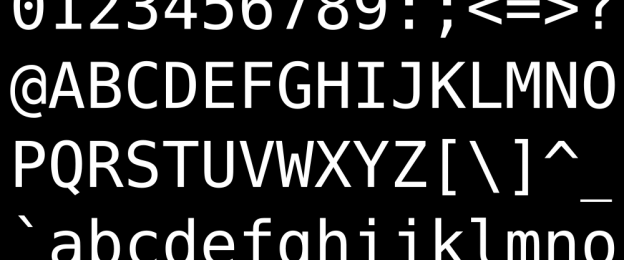
Have you ever tried to write Java code with non-ASCII characters? Like having French method names?
The other day I stumbled upon Java classes written in French. Class names like “Opération”, methods names like “getRéalisateur” and embedded log messages and comments all the same.
At first you say “not common but cool” (and you start thinking about writing code in Chinese because your boss always wondered how we could forbid clients from decompiling our classes without using an obfuscator).
But cool it is not!
Why? Because of encoding!
Here is a quiz, what is the encoding those Java files were saved in?
Just wonder for a while.
Answer is #3 because the Java IDE (Eclipse in this case) is by default using the platform encoding to save files. And those classes have been created on a Mac.
I actually had no problem reading and compiling them because I also use Eclipse on a Mac and because the Java compiler is also assuming the source files are in the platform encoding.
So what, nothing wrong then? Yeah, except the integration server is running on Ubuntu and sometimes I work on Windows as well. And on those platforms the default encoding is not MacRoman…
Something interesting is that it is always like that! I mean, even when you code in plain English there are chances that your IDE is going to write the files in the platform encoding. But nobody notices because as long as you only use characters in the ASCII-7 range, then they will be encoded the same in almost all encodings.
So what is the solution? Well it depends if you really want to code in French (or in Chinese). My advice anyway is “don’t do that” and externalize localized strings. However, if you really insist you have two solutions:
However, be aware that #1 is not always possible, you might be using processing tools that do not offer you the option to use something else than the platform encoding.
Have fun with encoding :)
Image Credits: Arite

Last Saturday I was chatting with my colleague David about communication issues inside the enterprise. As architects, some of our objectives are to coach the development teams, publicize the architecture and the frameworks and promote new technologies. We were wondering how we could improve the communication and especially make it more fluid.
Yesterday, inspired by Twitter, I setup a Skype public chat group for the company I currently work for. This morning I sent a mail to almost everyone and started to disseminate information about the group in the corporate wiki.
And almost nothing happened, only a few people showed up and no communication occurred. I am sure this a good idea, but I think something as to actually happen to demonstrate its usefulness, may be we need to bootstrap the flow by starting to push information instead of waiting for questions to come.
Yeah, exactly like micro-blogging on Twitter :)
Image Credits: CenTerO / JaguariTech
After one year and a half I finally managed to edit the videos Yang and I made during our 2006 three months trip in China.
I uploaded them on YouTube at http://youtube.com/user/cvedovini.
Here is one of the funniest, it is a Chinese clown who was performing in the Pingyao theater. Enjoy :)